Extensions
Real Firefox add‑ons.
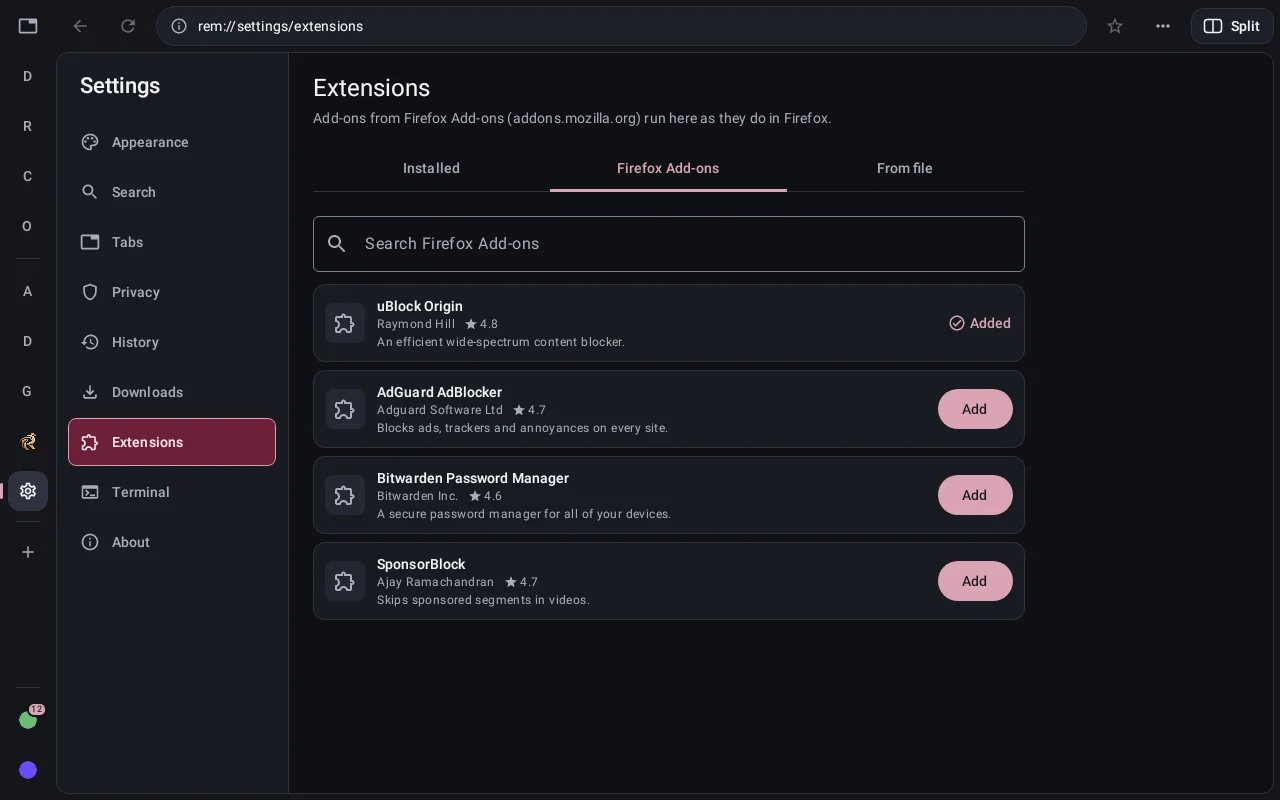
Bitwarden, SponsorBlock, Dark Reader and the rest, straight from Firefox Add-ons. uBlock Origin blocks ads from the first launch.
RemBrowse
Up to four pages side by side. Firefox inside. Made for Googlebook.
Free · Android 8.0 or later

Grid layout divides a page into regions and defines how they relate in size, position and order.
rem@homelab:~$ uptime
 18:02  up 41 days,  load average: 0.08
rem@homelab:~$ docker ps --format '{{.Names}}'
nextcloud
home-assistant
backup  Restarting (1)
rem@homelab:~$ docker logs backup
Drag a tab onto the edge of a page to split it. Each split gets its own divider.
Extensions
Bitwarden, SponsorBlock, Dark Reader and the rest, straight from Firefox Add-ons. uBlock Origin blocks ads from the first launch.
Terminal
Keep a server beside your pages. Saved hosts, generated keys, and Tailscale SSH sign-in.
rem@homelab:~$ uptime -p
up 41 days, 6 hours
rem@homelab:~$ df -h /home
Size  Used Avail Use%
457G  188G  246G  44%
rem@homelab:~$ ls
backup  nextcloud  site
rem@homelab:~$ git -C site pull
Already up to date.
rem@homelab:~$
Keyboard
One palette for tabs, addresses and commands, plus the shortcuts you already know.
Touchpad
Right-click links and pictures, scroll with two fingers, and resize the window freely.
Phone
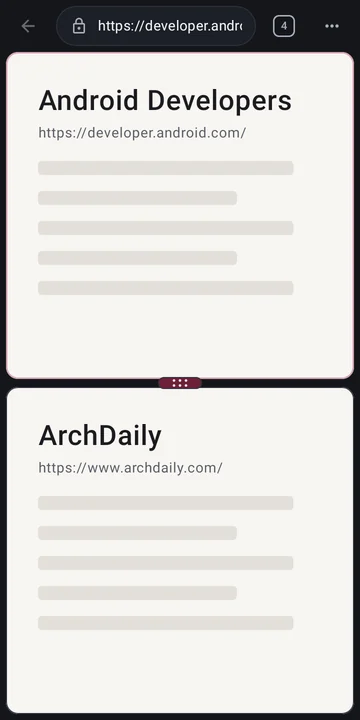
Two pages stack, the tab rail folds away.
Privacy
Blocking is built in, and there's nothing to sign in to. Your history stays on the device.
Firefox's tracking protection is built in. A stricter level also stops fingerprinters, cryptominers and email trackers.
uBlock Origin is set up on first launch: search ads included, and trackers hiding behind a site's own address. Switch it off whenever you like.
There's no RemBrowse account, sync, analytics or crash reporting. Nothing you browse is sent to us.
Updates
It finds a new version, checks its size and SHA‑256, and hands it to Android's installer. Your tabs stay put.
Free. These buttons always fetch the newest version.
Latest version
x86_64
Most Android laptops.
Download for Intel or AMDarm64-v8a
Phones, tablets and ARM laptops.
Download for ARMGet the file for your processor, on the device itself.
If Android asks, let your browser install apps. It only asks once.
From then on RemBrowse keeps itself up to date.
Using 0.13.7 or older? Install this version by hand once; its update check looks somewhere that is closed now. It installs over the old one and keeps your tabs and settings.
Coming from 0.08 or older? Those were signed with a different key. Uninstall them first, which removes their tabs, bookmarks and extensions.
Each file's SHA-256 is shown on its card. Every release since 0.09 is signed with the same key, whose certificate has this SHA-256 fingerprint:
F1:A5:30:6A:47:E4:BE:78:AD:7F:B0:C1:41:88:71:E3:A6:C9:A8:35:13:49:E2:42:39:DB:20:B4:75:B2:BE:06
To check it on a computer with the Android SDK:
apksigner verify --print-certs RemBrowse-x86_64.apk
RemBrowse is a minimal, tiled web browser for Android laptops (Googlebook OS) and Android devices. It is built on Mozilla GeckoView, Firefox's engine, and shows up to four pages side by side in one window.
Yes. RemBrowse is free to download. There is no RemBrowse account, sync, analytics or crash reporting, and nothing you browse is sent to us.
Any Android device running Android 8.0 or later: phones, tablets and laptops. It is made for Googlebook, where the split view and keyboard shortcuts shine. Pick the Intel or AMD (x86_64) download for most Android laptops, or ARM (arm64-v8a) for phones, tablets and ARM laptops.
Yes. RemBrowse runs real Firefox add-ons. Browse and install them from Firefox Add-ons in Settings, such as Bitwarden, SponsorBlock and Dark Reader. uBlock Origin is set up on first launch to block ads, and you can switch it off or remove it in Settings.
Download the file for your processor on the device itself and open it. If Android asks, let your browser install apps. Each download shows its SHA-256, and every release since 0.09 is signed with the same key, so you can check the file against the fingerprint under Check a download. After that RemBrowse keeps itself up to date: it checks a new version's size and SHA-256, then hands it to Android's installer, and your tabs stay put.